
Find a live stream
Checks the streamer’s linked YouTube channel first, then searches by Twitch name. Or paste a link and go.
CHROME EXTENSION
Play a YouTube livestream inside a Twitch channel.
Find the matching stream or paste a link.
Free to useOpen sourceNo extra account
FEATURES
The YouTube player replaces the video. Twitch chat, badges, and channel controls stay where they are.
Checks the streamer’s linked YouTube channel first, then searches by Twitch name. Or paste a link and go.
Mirror Twitch messages over the player. Adjust the position, size, background, and text. Floating chat is optional and read-only.
Sync Now seeks toward YouTube’s live edge. Auto-sync repeats every 10 minutes. Video and chat delays can still differ.
Pick up after a reload, revisit recent streams, and pin the ones you keep coming back to.
Restore Twitch brings back its player with your original pause, mute, and volume settings.
SETUP
Chrome 102 or newer. No separate extension account.
Install the free extension from the Chrome Web Store.
Get the extensionHead to the streamer you want to watch. Click YPFT on the right of the top navigation.
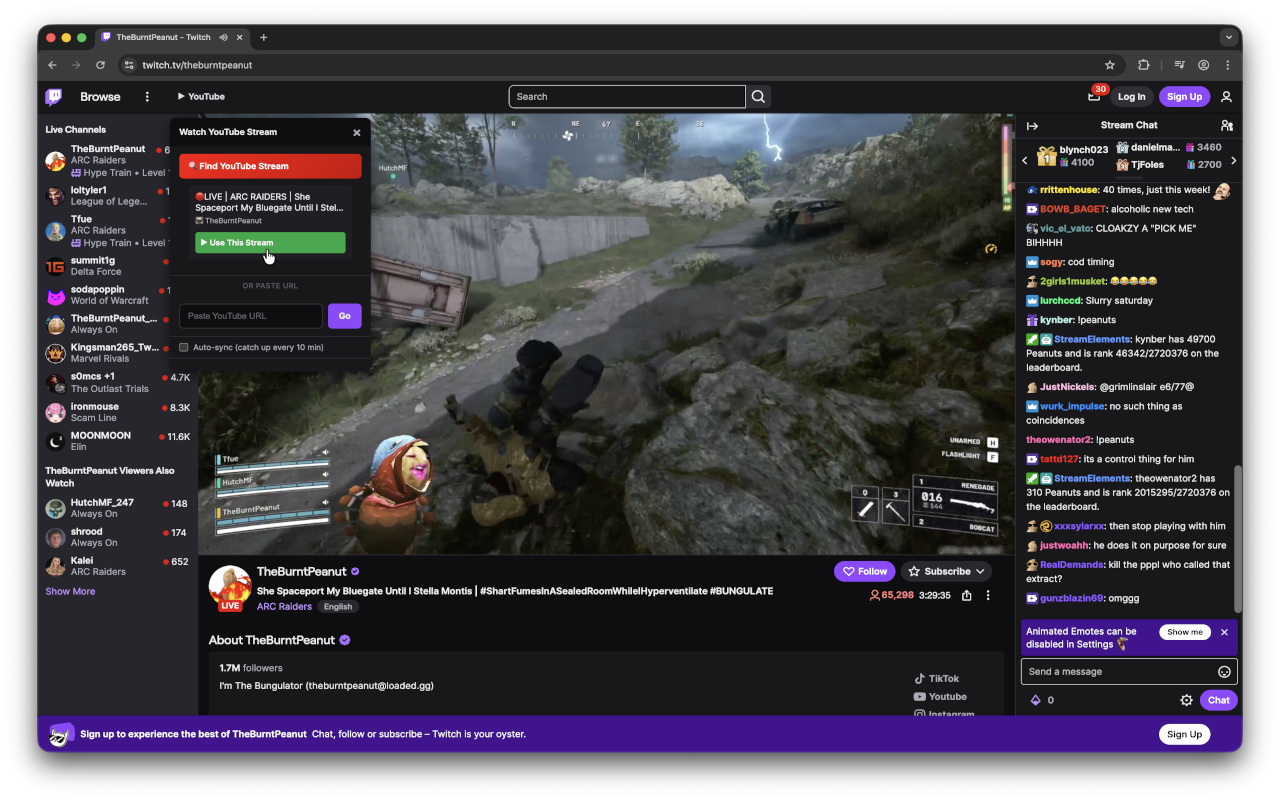
Choose Find YouTube Stream → Use This Stream, or paste a YouTube link and click Go.
ON TWITCH
The stream search menu on a Twitch channel. Theatre mode and fullscreen controls are available from the extension.
SOURCE & PRIVACY
Free, open source, and made by vrnrn. Settings and stream history stay on your device. No developer analytics or telemetry.
Yes. The extension is free to use and open source under the MIT license. You don’t need a separate account for the extension.
To watch the same live broadcast with its Twitch community, the streamer needs a matching YouTube stream. You can also paste another YouTube video or livestream URL. Automatic discovery checks the linked YouTube channel first; fallback search may suggest an approximate match, so check the title and channel before playing.
The normal Twitch chat and channel interface stay available, including badges, emotes, and channel points. Twitch controls your account’s access and rewards. Floating chat is a read-only mirror; send messages and use moderation tools in the normal chat.
Not necessarily. YouTube and Twitch can have different broadcast delays. Sync Now seeks toward YouTube’s live edge and briefly requests 2× playback to catch up. Optional auto-sync repeats every 10 minutes, but exact alignment with Twitch messages isn’t guaranteed.
YouTube’s embedded player offers the quality options available for the stream, including 4K/60fps when supported. To bring chat into fullscreen, enable Floating chat under Settings → Chat and use Fullscreen with chat. Keep the normal Twitch chat open so there are messages to mirror. Floating chat starts off by default.
The extension stores preferences, history, and playback state locally in Chrome. It doesn’t send those to the developer and has no developer analytics or telemetry. Search and playback make requests directly to YouTube and Twitch, which apply their own privacy policies. Read the full privacy policy.

Install from the Chrome Web Store.
Add to Chrome Free · Chrome 102+